
How to add users to your CustomCat account
-
Login to your CustomCat account.
- Go to Settings > Users.
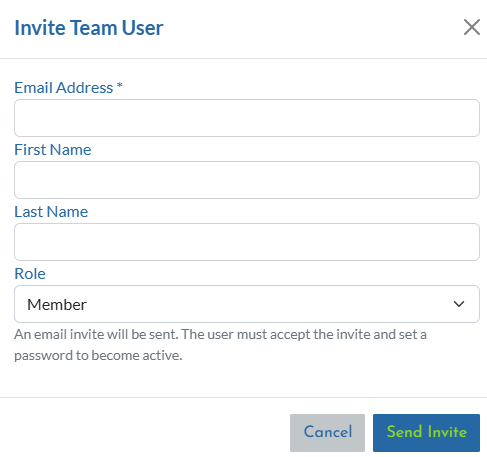
- Click Invite User, enter the team member's email address, choose their role and click Send Invite.
Role Types
| Permission / Access Area | Owner | Admin | Member |
|---|---|---|---|
| View & Manage Orders | ✔ | ✔ | ✔ |
| Create Products | ✔ | ✔ | ✔ |
| Access Design Library | ✔ | ✔ | ✔ |
| Access My Products | ✔ | ✔ | ✔ |
| Order Now (Manual Orders) | ✔ | ✔ | ✔ |
| Store Dashboard | ✔ | ✔ | ✔ |
| Connect Store | ✔ | ✔ | ❌ |
| Edit Store Settings | ✔ | ✔ | ❌ |
| Edit Account Address | ✔ | ✔ | ❌ |
| Access Wallet & Billing | ✔ | ✔ | ❌ |
| Manage Users & Roles | ✔ | ✔ | ❌ |
| Delete Owner | ✔ | ❌ | ❌ |
Plan-Based Access Limits
| Lite | Pro | Enterprise | |
|---|---|---|---|
| Team Collaboration | ❌ | ✔ Up to 5 Users | ✔ Unlimited Users |
| Admin Accounts | ❌ | ✔ | ✔ |
| Member Accounts | ❌ | ✔ | ✔ |
| Owner Account | ✔ | ✔ | ✔ |
Best Practices
For growing teams, we recommend:
-
Keep Owner access limited to leadership
-
Assign Admin roles only to trusted managers
-
Use Member roles for:
-
Customer service
-
Designers
-
Order processors
-
-
Regularly review user access
Clear role separation reduces operational risk and improves internal accountability.
Frequently Asked Questions
Can Lite users add team members?
No. Lite accounts support only one user.
Can Admins delete the Owner?
No. Only the Owner has full account control.
Can Members connect stores?
No. Store connections and settings are restricted to Admin and Owner roles.
Can Members change billing or wallet settings?
No. Financial controls are restricted to Admin and Owner roles.
Can a user have access to multiple CustomCat accounts?
No. Each email address can only be associated with one CustomCat account. If the member you want to add is already part of a different CustomCat account, they'll need to use a different email to join your account.